---
title: "August 2026 Release Notes: Account Settings, User Profile, Sorting & Filtering Updates"
description: GovSpend August 2026 Release Notes
---
[Skip to content](https://support.govspend.com/august-2026-release-notes#main-content)
English
Show submenu for translations
[![GS Logo-GS platform.png\]](https://support.govspend.com/hs-fs/hubfs/GS%20Logo-GS%20platform.png?height=25&name=GS%20Logo-GS%20platform.png)](https://support.govspend.com/?hsLang=en)
- [Home](https://support.govspend.com/)
- [Email Support](mailto:support@govspend.com)
- [Product Health Status](https://support.govspend.com/product-health-status)
- [What's New](https://support.govspend.com/)
Show submenu for What's New
- [New User Onboarding](https://support.govspend.com/govspend-onboarding-journey)
- [Releases & Updates](https://support.govspend.com/releases-updates)
- [Newsletters](https://support.govspend.com/newsletter-archive)
- [Sales Training Videos](https://app.govspend.com/trainingVideos)
Open main navigation
Close main navigation
- [Home](https://support.govspend.com/)
- [Email Support](mailto:support@govspend.com)
- [Product Health Status](https://support.govspend.com/product-health-status)
- [What's New](https://support.govspend.com/)
Show submenu for What's New
- [New User Onboarding](https://support.govspend.com/govspend-onboarding-journey)
- [Releases & Updates](https://support.govspend.com/releases-updates)
- [Newsletters](https://support.govspend.com/newsletter-archive)
- [Sales Training Videos](https://app.govspend.com/trainingVideos)
- English
Show submenu for translations
- [Log into GovSpend](https://app.govspend.com/)
[Log into GovSpend](https://app.govspend.com/)
Skip the browsing—search for the fastest, most relevant results.
- There are no suggestions because the search field is empty.
1. [GovSpend Help Center](https://support.govspend.com/?hsLang=en)
2. [Releases & Updates](https://support.govspend.com/releases-updates?hsLang=en)
3. [2026 Product Enhancements](https://support.govspend.com/releases-updates?hsLang=en#2026-product-enhancements)
# August 2026 Release Notes: Account Settings, User Profile, Sorting & Filtering Updates
## This article reviews product enhancements released in August 2026. Read on to review these enhancements, how to find them, and where to learn more.
- **Account Settings & User Profile:** For Account Settings, we have consolidated your Organization and User profile settings into a single “Settings” page, making it easier for you to find and manage what you need. [Learn more →](https://support.govspend.com/customizing-your-organization-user-profile?hsLang=en)
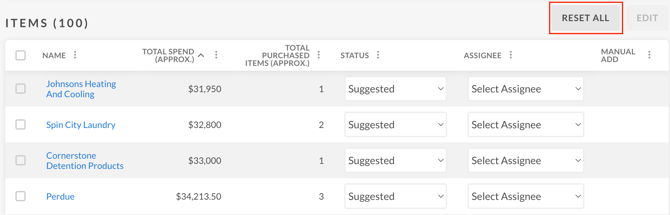
- **Sort and Filter Selections Now Persist in Lists:** For Lists, your sort and filter selections now remain applied when you navigate away or refresh the page, so you don’t need to reapply them each time. We have also added a new “Reset All” button so you can quickly return all selections to their defaults.
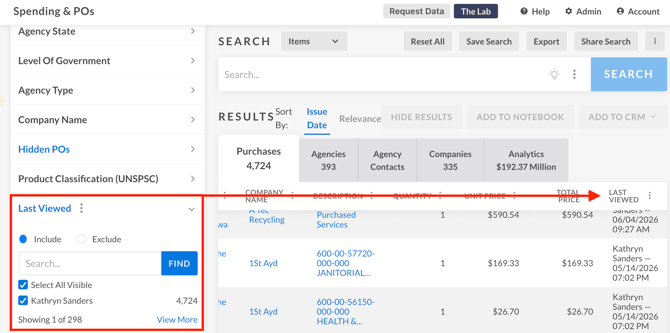
- **"Last Viewed" Filtering and Export Support:** You can now filter records by who on your team has viewed them, including the option to exclude records you’ve already viewed. We have also added “Last Viewed” as a field when exporting Bids, Contracts, Spending, and Meetings using either the Default or Visible Columns Only option.
- Navigate to Bids, Contracts, Spending, or Meetings
- Select “Add Filter” and search for "Last Viewed"
- Filter by teammate, or select the option to exclude records you've already viewed
- **Sort Ascending/Descending Added to Agency Name and Company Name:** The Agency Name column (Bids, Contracts, Spending) and Company Name column (Spending) can now be sorted ascending or descending, matching the sort behavior already available on other columns.
- Navigate to Bids, Contracts, or Spending
- Click the Agencies tab (or Companies tab in Spending)
- Click the three-dot menu next to Agency Name (or Company Name)
- Select Sort Ascending or Sort Descending
- - **Saved Density Settings:** Your preferred table density setting is now saved and applied across all GovSpend Federal modules, so you won’t need to reset it each time you return.

- **Enhanced Date Pickers:** Date filters now include an improved date picker and interactive calendar, making it easier to select and adjust date ranges.Federal Dataset User Interface Updates

- **Socioeconomic Indicator Improvements:** We’ve fixed display and alignment issues with socioeconomic indicator options across filters and columns for a cleaner, more consistent experience.
- [Getting Started](https://support.govspend.com/getting-started?hsLang=en#main-content)
- [New User Onboarding](https://support.govspend.com/getting-started?hsLang=en#new-user-onboarding)
- [Free Trial Guides](https://support.govspend.com/free-trial-guides?hsLang=en)
- [The Lab](https://support.govspend.com/the-lab?hsLang=en#main-content)
- [\[Concept & Design\] Potential Upcoming Features](https://support.govspend.com/the-lab?hsLang=en#concept-design-potential-upcoming-features)
- [\[Beta\] AI Search](https://support.govspend.com/the-lab?hsLang=en#beta-ai-search)
- [\[Beta\] GovSpend Slack App](https://support.govspend.com/the-lab?hsLang=en#beta-govspend-slack-app)
- [Searching & Filtering](https://support.govspend.com/searching-filtering?hsLang=en#main-content)
- [General Search](https://support.govspend.com/searching-filtering?hsLang=en#general-search)
- [Module-Specific Search](https://support.govspend.com/searching-filtering?hsLang=en#module-specific-search)
- [Workflow Tips](https://support.govspend.com/searching-filtering?hsLang=en#workflow-tips)
- [AI & Automation](https://support.govspend.com/ai-automation?hsLang=en#main-content)
- [AI Access Points](https://support.govspend.com/ai-automation?hsLang=en#ai-access-points)
- [Opportunities Module](https://support.govspend.com/ai-automation?hsLang=en#opportunities-module)
- [MCP (Model Context Protocol) Server](https://support.govspend.com/ai-automation?hsLang=en#mcp-model-context-protocol-server)
- [AI Prompts & Chat](https://support.govspend.com/ai-automation?hsLang=en#ai-prompts-chat)
- [AI Notebook](https://support.govspend.com/ai-automation?hsLang=en#ai-notebook)
- [Integrations & Add-Ons](https://support.govspend.com/integrations-add-ons?hsLang=en#main-content)
- [CRM Integration](https://support.govspend.com/integrations-add-ons?hsLang=en#crm-integration)
- [Other Integrations](https://support.govspend.com/integrations-add-ons?hsLang=en#other-integrations)
- [Add-Ons](https://support.govspend.com/integrations-add-ons?hsLang=en#add-ons)
- [Training Webinars](https://support.govspend.com/training-webinars?hsLang=en#main-content)
- [Platform Training](https://support.govspend.com/training-webinars?hsLang=en#platform-training)
- [Platform Strategy](https://support.govspend.com/training-webinars?hsLang=en#platform-strategy)
- [Webinar Series | Beyond the Bid: Industry Insights That Win](https://support.govspend.com/training-webinars?hsLang=en#webinar-series-beyond-the-bid-industry-insights-that-win)
- [Report Templates](https://support.govspend.com/report-templates?hsLang=en)
- [Releases & Updates](https://support.govspend.com/releases-updates?hsLang=en#main-content)
- [2026 Product Enhancements](https://support.govspend.com/releases-updates?hsLang=en#2026-product-enhancements)
- [2025 Product Enhancements](https://support.govspend.com/releases-updates?hsLang=en#2025-product-enhancements)
- [2024 Product Enhancements](https://support.govspend.com/releases-updates?hsLang=en#2024-product-enhancements)
- [2023 Product Enhancements](https://support.govspend.com/releases-updates?hsLang=en#2023-product-enhancements)
- [Newsletters](https://support.govspend.com/releases-updates?hsLang=en#newsletters)
- [Data Overviews](https://support.govspend.com/data-overviews?hsLang=en)
- [Quotes & RFQs](https://support.govspend.com/quotes-rfqs?hsLang=en#main-content)
- [For Companies](https://support.govspend.com/quotes-rfqs?hsLang=en#for-companies)
- [For Agencies](https://support.govspend.com/quotes-rfqs?hsLang=en#for-agencies)
- [Technical Support](https://support.govspend.com/technical-support?hsLang=en)
- [Agency Launchpad](https://support.govspend.com/agency-launchpad?hsLang=en)
- [GovSpend Federal](https://support.govspend.com/govspend-federal?hsLang=en#main-content)
- [Introduction](https://support.govspend.com/govspend-federal?hsLang=en#introduction)
- [Search Modules](https://support.govspend.com/govspend-federal?hsLang=en#search-modules)
- [Opportunities](https://support.govspend.com/govspend-federal?hsLang=en#opportunities)
[](https://support.govspend.com?hsLang=en)
[Privacy](https://govspend.com/privacy/) | [Terms](https://govspend.com/terms/)
Copyright © 2025 GovSpend