![GS Logo-GS platform.png]](https://support.govspend.com/hs-fs/hubfs/GS%20Logo-GS%20platform.png?height=25&name=GS%20Logo-GS%20platform.png)
The Opportunities module is your personalized signal engine for discovering and acting on the most relevant federal opportunities — without running dozens of manual searches. Instead of spending time combing through SAM.gov, meetings, and procurement data, this signal-driven module automatically surfaces and prioritizes opportunities for you using:
-
GovSpend data (expiring contracts, DIBBS opportunities, federal meetings, SAM opportunities)
-
Public web signals (federal news)
-
Your personalized Federal Profile (products, services, competitors, agencies, NAICS & PSC, contract vehicles, socioeconomic interests)
Your Profile Powers Your Opportunities
Your profile allows GovSpend to proactively identify relevant opportunities on your behalf. Click here to review your Federal Profile.
Your profile is taken from your Organization’s Federal Profile. Contact your Company Admin to refine the Company Profile so all subsequent users can benefit from selections made for all users. Users can adjust any of these settings to suit their individual needs.
Signals Are Continuously Monitored
GovSpend monitors signals from two main sources:
-
GovSpend Data
-
Expiring Contracts — federal contracts approaching their expiration or option-year deadline, flagging potential upcoming recompete opportunities
-
DIBBS Opportunities — solicitations posted to DIBBS (DoD's Internet Bid Board System) for defense supply items
-
Federal Meetings — mentions of your products, services, or competitors surfaced in federal meeting records and agendas
-
SAM Opportunities — new solicitations posted to SAM.gov, the federal government's primary contract opportunity portal
-
-
Public Internet Signals
- Federal News — public web coverage tied to federal agency initiatives or procurement-related announcements
These signals are analyzed and matched against your profile automatically.
There are two places where you can review and update the signals you want to track:
-
From your My Profile Page:
-
From the Account menu, open your user profile via Settings → Federal Profile
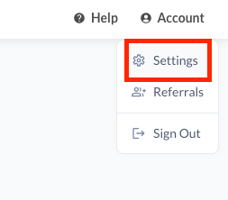
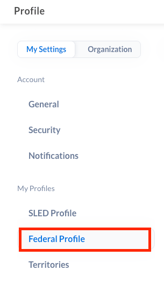
-
Within your Federal Profile, scroll to the bottom to find your Signal Settings
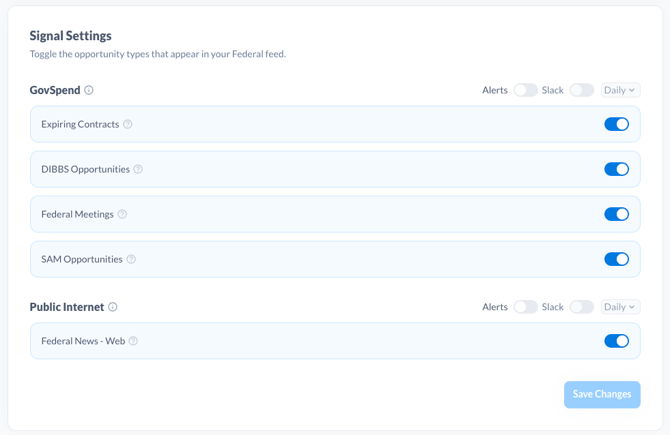
-
Toggle on the signals that you want to track within GovSpend and across the Public Internet
-
Note that if you make changes to the signals you want to track, it can take up to 4 hours for those changes to reflect on your Opportunities module.
-
-
From the Opportunities module "Settings":
-
Navigate to Opportunities via the link in the left menu
-
Find and select the 3-dot menu in the top right of your screen
-
Select "Settings"
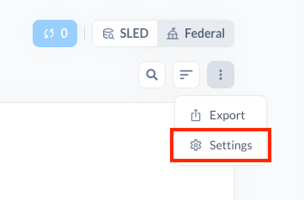
-
Review and update your signals from within the modal window that opens
-
Click "Save Settings" once complete
-
Any changes to your signal selections you make here will automatically update on your My Profile page
-
How to Get the Most from Opportunities:
-
Review your Opportunities module regularly — it's designed to be your daily starting point.
-
Keep your Federal Profile updated so opportunities stay aligned with your goals.
-
Use opportunity explanations to prioritize where your team should focus first.