---
title: How to Set Up Your Organization Profile for Quotes
description: Below we walk you through the initial steps of setting up your organization's profile in GovSpend.
---
[Skip to content](https://support.govspend.com/how-to-set-up-your-organization-profile#main-content)
English
Show submenu for translations
[![GS Logo-GS platform.png\]](https://support.govspend.com/hs-fs/hubfs/GS%20Logo-GS%20platform.png?height=25&name=GS%20Logo-GS%20platform.png)](https://support.govspend.com/?hsLang=en)
- [Home](https://support.govspend.com/)
- [Email Support](mailto:support@govspend.com)
- [Product Health Status](https://support.govspend.com/product-health-status)
- [What's New](https://support.govspend.com/)
Show submenu for What's New
- [New User Onboarding](https://support.govspend.com/govspend-onboarding-journey)
- [Releases & Updates](https://support.govspend.com/releases-updates)
- [Newsletters](https://support.govspend.com/newsletter-archive)
- [Sales Training Videos](https://app.govspend.com/trainingVideos)
Open main navigation
Close main navigation
- [Home](https://support.govspend.com/)
- [Email Support](mailto:support@govspend.com)
- [Product Health Status](https://support.govspend.com/product-health-status)
- [What's New](https://support.govspend.com/)
Show submenu for What's New
- [New User Onboarding](https://support.govspend.com/govspend-onboarding-journey)
- [Releases & Updates](https://support.govspend.com/releases-updates)
- [Newsletters](https://support.govspend.com/newsletter-archive)
- [Sales Training Videos](https://app.govspend.com/trainingVideos)
- English
Show submenu for translations
- [Log into GovSpend](https://app.govspend.com/)
[Log into GovSpend](https://app.govspend.com/)
Skip the browsing—search for the fastest, most relevant results.
- There are no suggestions because the search field is empty.
1. [GovSpend Help Center](https://support.govspend.com/?hsLang=en)
2. [Getting Started](https://support.govspend.com/getting-started?hsLang=en)
# How to Set Up Your Organization Profile for Quotes
## Below we walk you through the initial steps of setting up your organization's profile in GovSpend, specifically for the Quotes platform.
#### To create your agency or company profile in GovSpend:
**1.** Go to [https://app.govspend.com/](https://app.govspend.com/)
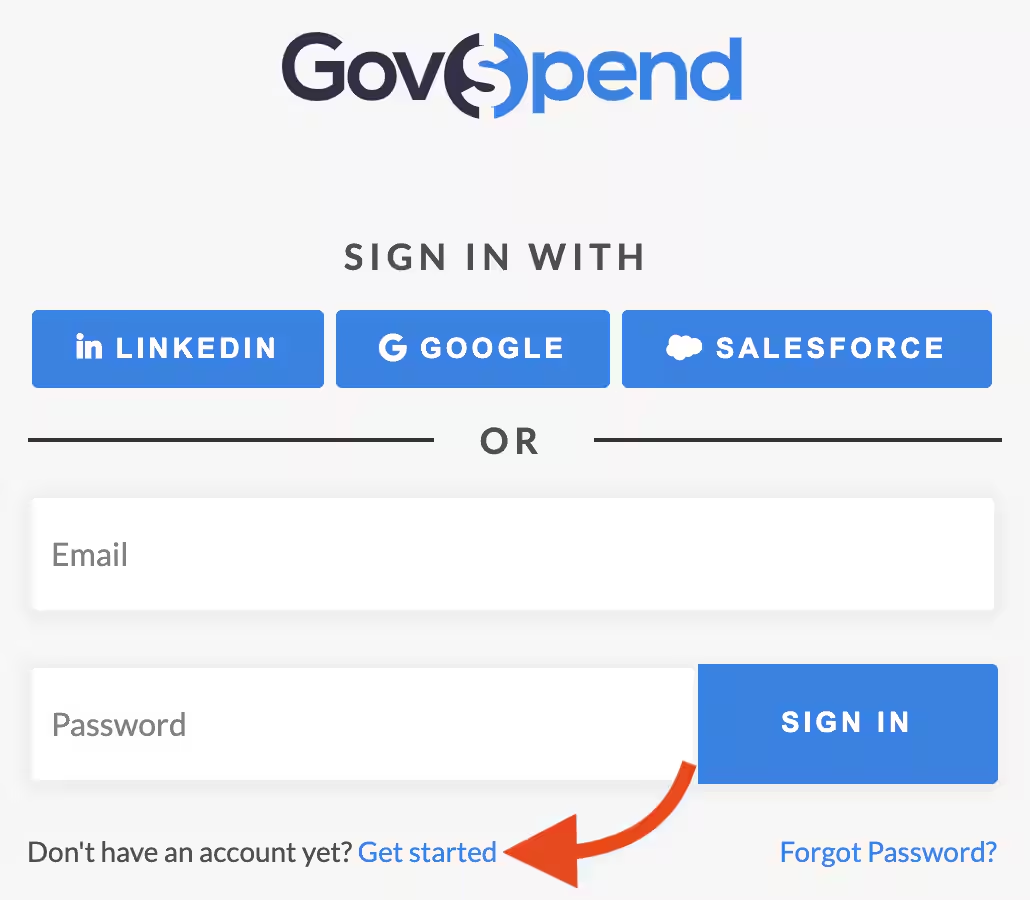
**2.** Click the 'Get Started' button towards the bottom of the screen.
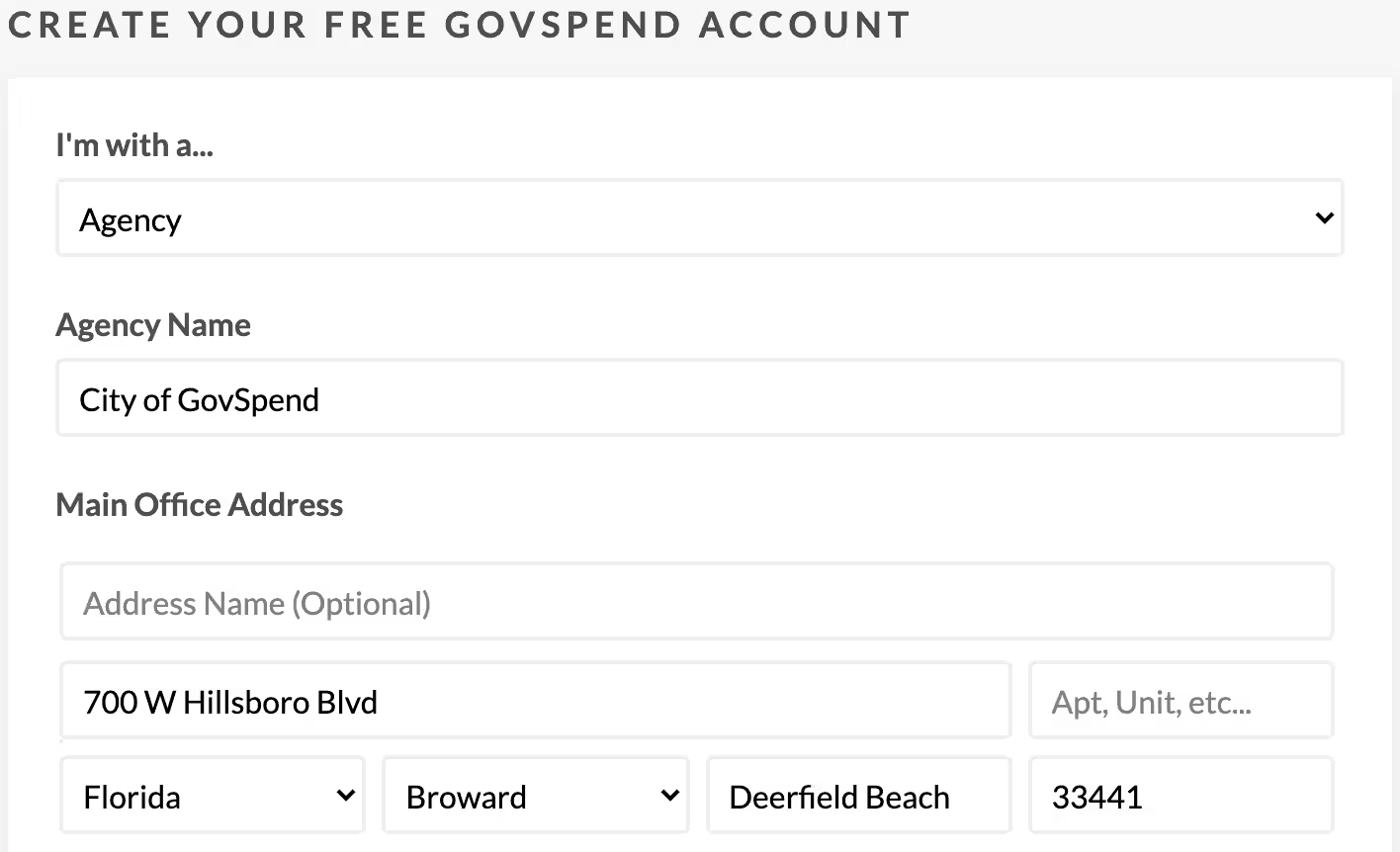
**3.** Go to 'I'm with a...' and then select either 'Agency' or 'Company' from the drop-down menu, depending on which type of organization you are.
**4.** Enter your organization name.
**5.** Add your main office address.
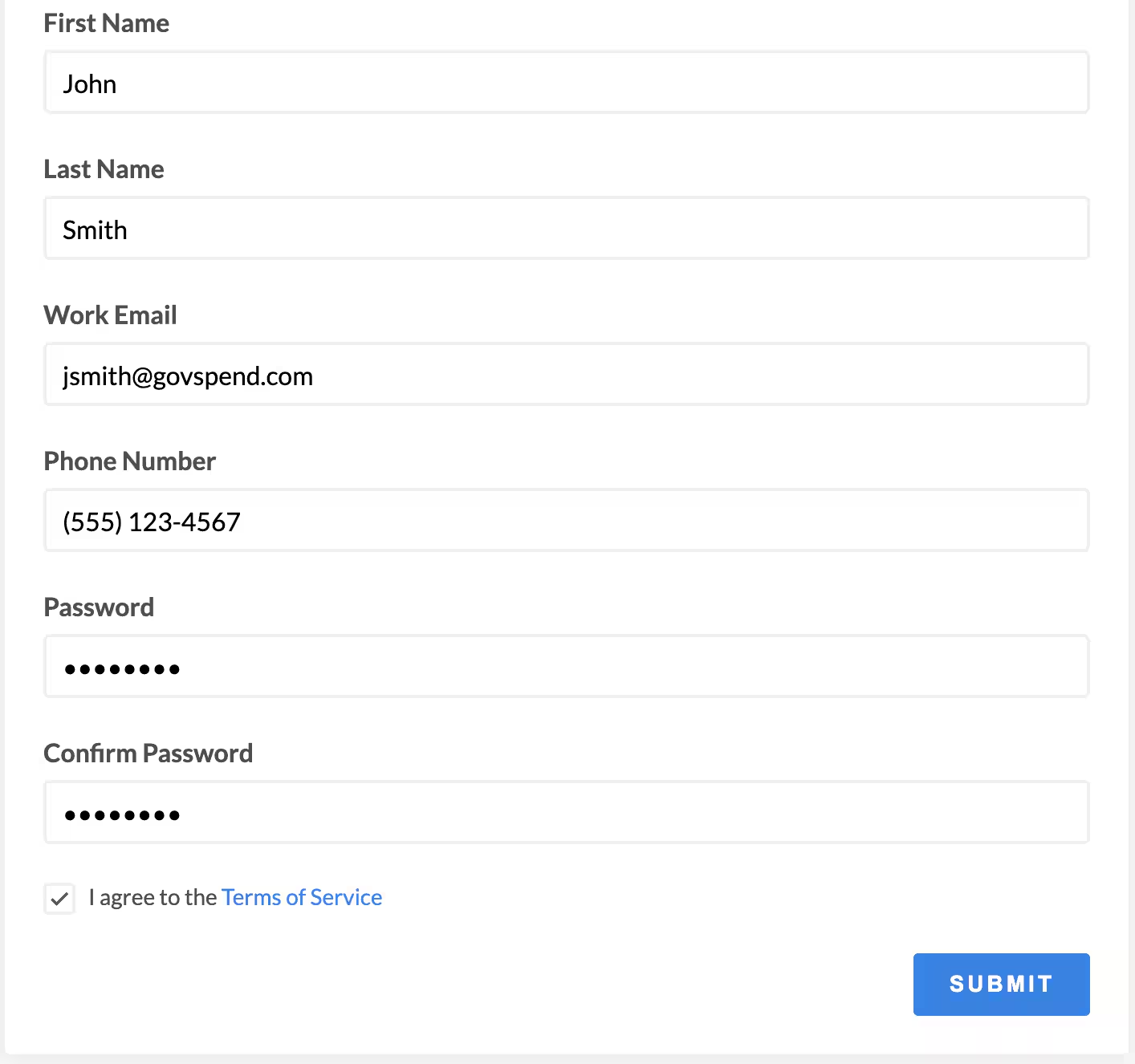
**6.** Enter your first and last name.
**7.** Enter your email address.
**8.** Add your phone number.
**9.** Finally, enter and confirm a new password.
**10.** After you agree to the terms of service, click 'Submit'.
***Please note:** Don't forget to check your email for a verification link. Once you click the link, your organization's account will be ready to start sending requests/responding to quotes. You will not be able to send requests or respond to quotes until you've verified your email.*
#### To edit your Quotes Organization profile in GovSpend:
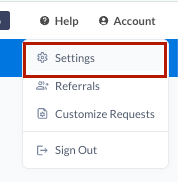
**1.** Click on 'Account' in the top right corner of GovSpend.
**2.** Click on "Settings"
**3.** From the Organization tab, click "[Quotes Profile](https://app.govspend.com/account/organizationProfile)"
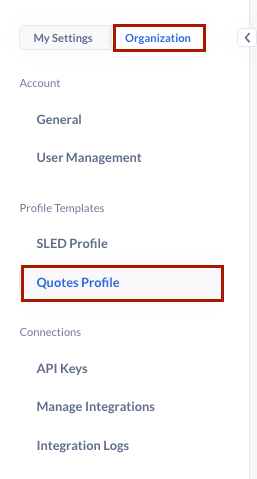
4. Make any desired changes and click "Save"
- [Getting Started](https://support.govspend.com/getting-started?hsLang=en#main-content)
- [New User Onboarding](https://support.govspend.com/getting-started?hsLang=en#new-user-onboarding)
- [Free Trial Guides](https://support.govspend.com/free-trial-guides?hsLang=en)
- [The Lab](https://support.govspend.com/the-lab?hsLang=en#main-content)
- [\[Concept & Design\] Potential Upcoming Features](https://support.govspend.com/the-lab?hsLang=en#concept-design-potential-upcoming-features)
- [\[Beta\] AI Search](https://support.govspend.com/the-lab?hsLang=en#beta-ai-search)
- [\[Beta\] GovSpend Slack App](https://support.govspend.com/the-lab?hsLang=en#beta-govspend-slack-app)
- [Searching & Filtering](https://support.govspend.com/searching-filtering?hsLang=en#main-content)
- [General Search](https://support.govspend.com/searching-filtering?hsLang=en#general-search)
- [Module-Specific Search](https://support.govspend.com/searching-filtering?hsLang=en#module-specific-search)
- [Workflow Tips](https://support.govspend.com/searching-filtering?hsLang=en#workflow-tips)
- [AI & Automation](https://support.govspend.com/ai-automation?hsLang=en#main-content)
- [AI Access Points](https://support.govspend.com/ai-automation?hsLang=en#ai-access-points)
- [Opportunities Module](https://support.govspend.com/ai-automation?hsLang=en#opportunities-module)
- [MCP (Model Context Protocol) Server](https://support.govspend.com/ai-automation?hsLang=en#mcp-model-context-protocol-server)
- [AI Prompts & Chat](https://support.govspend.com/ai-automation?hsLang=en#ai-prompts-chat)
- [AI Notebook](https://support.govspend.com/ai-automation?hsLang=en#ai-notebook)
- [Integrations & Add-Ons](https://support.govspend.com/integrations-add-ons?hsLang=en#main-content)
- [\[CRM Integration\] Introduction](https://support.govspend.com/integrations-add-ons?hsLang=en#crm-integration-introduction)
- [\[CRM Integration\] Setup: Tech Onboarding](https://support.govspend.com/integrations-add-ons?hsLang=en#crm-integration-setup-tech-onboarding)
- [\[CRM Integration\] Quick Start Guide](https://support.govspend.com/integrations-add-ons?hsLang=en#crm-integration-quick-start-guide)
- [\[CRM Integration\] Additional Features](https://support.govspend.com/integrations-add-ons?hsLang=en#crm-integration-additional-features)
- [Other Integrations](https://support.govspend.com/integrations-add-ons?hsLang=en#other-integrations)
- [Add-Ons](https://support.govspend.com/integrations-add-ons?hsLang=en#add-ons)
- [Training Webinars](https://support.govspend.com/training-webinars?hsLang=en#main-content)
- [Platform Training](https://support.govspend.com/training-webinars?hsLang=en#platform-training)
- [Platform Strategy](https://support.govspend.com/training-webinars?hsLang=en#platform-strategy)
- [Webinar Series | Beyond the Bid: Industry Insights That Win](https://support.govspend.com/training-webinars?hsLang=en#webinar-series-beyond-the-bid-industry-insights-that-win)
- [Report Templates](https://support.govspend.com/report-templates?hsLang=en)
- [Releases & Updates](https://support.govspend.com/releases-updates?hsLang=en#main-content)
- [2026 Product Enhancements](https://support.govspend.com/releases-updates?hsLang=en#2026-product-enhancements)
- [2025 Product Enhancements](https://support.govspend.com/releases-updates?hsLang=en#2025-product-enhancements)
- [2024 Product Enhancements](https://support.govspend.com/releases-updates?hsLang=en#2024-product-enhancements)
- [2023 Product Enhancements](https://support.govspend.com/releases-updates?hsLang=en#2023-product-enhancements)
- [Newsletters](https://support.govspend.com/releases-updates?hsLang=en#newsletters)
- [Data Overviews](https://support.govspend.com/data-overviews?hsLang=en#main-content)
- [Document Repository](https://support.govspend.com/data-overviews?hsLang=en#document-repository)
- [Quotes & RFQs](https://support.govspend.com/quotes-rfqs?hsLang=en#main-content)
- [For Companies](https://support.govspend.com/quotes-rfqs?hsLang=en#for-companies)
- [For Agencies](https://support.govspend.com/quotes-rfqs?hsLang=en#for-agencies)
- [Technical Support](https://support.govspend.com/technical-support?hsLang=en)
- [Agency Launchpad](https://support.govspend.com/agency-launchpad?hsLang=en)
- [GovSpend Federal](https://support.govspend.com/govspend-federal?hsLang=en#main-content)
- [Introduction](https://support.govspend.com/govspend-federal?hsLang=en#introduction)
- [Search Modules](https://support.govspend.com/govspend-federal?hsLang=en#search-modules)
- [Opportunities](https://support.govspend.com/govspend-federal?hsLang=en#opportunities)
[](https://support.govspend.com?hsLang=en)
[Privacy](https://govspend.com/privacy/) | [Terms](https://govspend.com/terms/)
Copyright © 2025 GovSpend