---
title: Managing Email Alerts & Notifications ▶️
description: The article will guide you on how set up and manage search alerts as well as notifications for Quotes, RFQs, and tasks.
---
[Skip to content](https://support.govspend.com/managing-email-alerts-and-notifications#main-content)
English
Show submenu for translations
[![GS Logo-GS platform.png\]](https://support.govspend.com/hs-fs/hubfs/GS%20Logo-GS%20platform.png?height=25&name=GS%20Logo-GS%20platform.png)](https://support.govspend.com/?hsLang=en)
- [Home](https://support.govspend.com/)
- [Email Support](mailto:support@govspend.com)
- [Product Health Status](https://support.govspend.com/product-health-status)
- [What's New](https://support.govspend.com/)
Show submenu for What's New
- [New User Onboarding](https://support.govspend.com/govspend-onboarding-journey)
- [Releases & Updates](https://support.govspend.com/releases-updates)
- [Newsletters](https://support.govspend.com/newsletter-archive)
- [Sales Training Videos](https://app.govspend.com/trainingVideos)
Open main navigation
Close main navigation
- [Home](https://support.govspend.com/)
- [Email Support](mailto:support@govspend.com)
- [Product Health Status](https://support.govspend.com/product-health-status)
- [What's New](https://support.govspend.com/)
Show submenu for What's New
- [New User Onboarding](https://support.govspend.com/govspend-onboarding-journey)
- [Releases & Updates](https://support.govspend.com/releases-updates)
- [Newsletters](https://support.govspend.com/newsletter-archive)
- [Sales Training Videos](https://app.govspend.com/trainingVideos)
- English
Show submenu for translations
- [Log into GovSpend](https://app.govspend.com/)
[Log into GovSpend](https://app.govspend.com/)
Skip the browsing—search for the fastest, most relevant results.
- There are no suggestions because the search field is empty.
1. [GovSpend Help Center](https://support.govspend.com/?hsLang=en)
2. [Searching & Filtering](https://support.govspend.com/searching-filtering?hsLang=en)
3. [General Search](https://support.govspend.com/searching-filtering?hsLang=en#general-search)
# Managing Email Alerts & Notifications ▶️
## The article will guide you on how set up and manage search alerts as well as notifications for Quotes, RFQs, and tasks.
***For general information on creating searches, [click here](https://support.govspend.com/how-to-create-searches?hsLang=en).***
### Watch a video:
### Follow these steps:
#### Managing Save Search Alerts
As a part of the GovSpend application, you can choose to receive alerts based on your Saved Searches. Get notified when new records are added to your search so you can take action immediately.
***Please note:** All alerts are sent to the email address associated with your user profile. Other users on your account can individually decide if they want the same alerts by following the below steps.*
#### Managing Alerts for Your Saved Searches
#### **Saved Searches Page**
Management and customization of your saved search alert settings are available on the Saved Searches page. To navigate to the Saved Searches page, use the left navigation menu and click "[Saved Searches](https://app.govspend.com/alerts)."
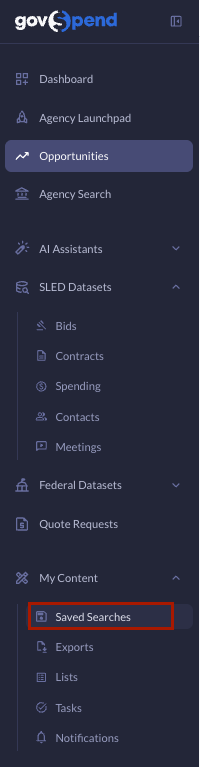

On the Saved Searches page, you will be able to turn on/off alerts and customize alert settings for each search. Below is an overview of the available alert settings:
- **Alert Status:** Use the "Alert Status" column to enable or disable alerts for any given search. Simply click the toggle for any search to turn alerts on or off.

- **Alert Frequency:** Select the frequency you want to receive alerts for each of your searches via the dropdown. Options are as follows:
- **Daily** - One daily email sent in the morning
- **Weekly** - One weekly email sent in the morning on Fridays
- **Immediate** (Bids & RFP's only) - Email sent every 4 hours

- **Alert Format:** Select the format of how you want to receive your searches in your alert emails. Options are either Digest or Individual. Learn more about the different Alert formats in the "Viewing Email Alerts for Your Saved Searches" section further down in this article.

- **Alert Group:** Choose whether you receive alerts on New, Updated, or New & Updated records.
***Please Note:** This applies to Bids & RFPs ONLY.*

#### **Individual Search Pages**
You can also turn alerts on/off on the search pages themselves. Seamlessly toggle alerts on/off when you first create and save a search.
Once you have created AND saved a search within a module that supports alerts, there are two ways you can turn alerts on for that search:
- Once you hit "Save Search", you will see a checkbox in the save modal that says "Notify me via email when new results match this search." Simply check that box to turn on alerts for that search.

- After saving, you will see an Alerts toggle at the top right of your page. Simply toggle that on to turn alerts on for your search. You will also see that toggle when you load any saved search.

When you turn on alerts from the search pages themselves, the following default alert settings will be applied. To change those, simply go to the [Saved Searches page](https://app.govspend.com/alerts), find that search, and make additional updates following the steps in the Saved Searches Page section above.
**Default Alert Settings:**
- **Bids & RFPs:** Daily, Digest, New & Updated
- **Spending & POs:** Daily, Digest
- **Co-ops & Contracts:** Daily, Digest
- **Meeting Intelligence:** Daily, Digest
- **Contacts:** Daily, Digest
***Please Note:** Alerts will be turned on automatically upon saving a Bids & RFPs search and set to the above default settings. You'll notice that when you save a Bid Search the "Notify me via email..." checkbox will already be checked. If you don't want alerts on for that search, you can uncheck that box before you save, OR toggle the Alerts toggle off when your saved search loads.*
**A Note about Contact Alerts:**
Contact data does not flow in as regularly as data across the other modules. In general, data is updated or refreshed every 180 days. Therefore, if you set up a Contacts search and turn on "Daily" alerts, you will likely not get new records every day, but will get an email alert within a day of new data being added. [Refer here](https://support.govspend.com/data-overview-contacts?hsLang=en) for more details on the Contact ingestion process.
#### Viewing Email Alerts for Your Saved Searches
There are two types of alert emails you can subscribe to for saved searches. Email Digests will combine all searches set at a given frequency into one email. Individual alert emails will include alerts for just one search.
#### **Digest**
View alerts for all searches you've set to the same alert frequency in one email:
- The subject header of the email contains alert frequency and alert format
- Searches will be organized by search type in the email body
- Up to 5 alert records will be displayed for each search
- Search links will open up the saved search in GovSpend filtered for the alert period
- Record links will open the details page in GovSpend with keyword highlighting available
- "Alert Settings" takes you to the saved searches page where you can modify your alert settings
[Click here](https://hubs.ly/Q02npZxD0) to view an example Email Digest.


### **Individual**
View alerts for one specific saved search in an email:
- The subject header of the email contains alert frequency, alert format, and the saved search name
- Up to 20 alert records will be displayed for the saved search in the email body
- Search links will open up the saved search in GovSpend filtered for the alert period
- Record links will open the details page in GovSpend with keyword highlighting available
- "Alert Settings" takes you to the saved searches page where you can modify your alert settings
#### **Notifications for Quotes & Tasks**
Alert management for Quotes & RFQs and Tasks is available on the Notifications settings page.
- To navigate to the Notifications page, click on "Account" in the top right of your page, select "Settings" and under My Settings click "[Notifications](https://app.govspend.com/account/notificationPreferences)".
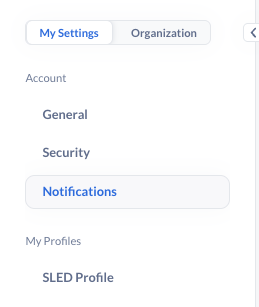

- From here, you will be able to enable/disable notifications for Quotes & RFQs and Tasks. Make changes as necessary and click "Submit" to update.
**Agency View:**

**Company View:**

- [Getting Started](https://support.govspend.com/getting-started?hsLang=en#main-content)
- [New User Onboarding](https://support.govspend.com/getting-started?hsLang=en#new-user-onboarding)
- [Free Trial Guides](https://support.govspend.com/free-trial-guides?hsLang=en)
- [The Lab](https://support.govspend.com/the-lab?hsLang=en#main-content)
- [\[Concept & Design\] Potential Upcoming Features](https://support.govspend.com/the-lab?hsLang=en#concept-design-potential-upcoming-features)
- [\[Beta\] AI Search](https://support.govspend.com/the-lab?hsLang=en#beta-ai-search)
- [\[Beta\] GovSpend Slack App](https://support.govspend.com/the-lab?hsLang=en#beta-govspend-slack-app)
- [Searching & Filtering](https://support.govspend.com/searching-filtering?hsLang=en#main-content)
- [General Search](https://support.govspend.com/searching-filtering?hsLang=en#general-search)
- [Module-Specific Search](https://support.govspend.com/searching-filtering?hsLang=en#module-specific-search)
- [Workflow Tips](https://support.govspend.com/searching-filtering?hsLang=en#workflow-tips)
- [AI & Automation](https://support.govspend.com/ai-automation?hsLang=en#main-content)
- [AI Access Points](https://support.govspend.com/ai-automation?hsLang=en#ai-access-points)
- [Opportunities Module](https://support.govspend.com/ai-automation?hsLang=en#opportunities-module)
- [MCP (Model Context Protocol) Server](https://support.govspend.com/ai-automation?hsLang=en#mcp-model-context-protocol-server)
- [AI Prompts & Chat](https://support.govspend.com/ai-automation?hsLang=en#ai-prompts-chat)
- [AI Notebook](https://support.govspend.com/ai-automation?hsLang=en#ai-notebook)
- [Integrations & Add-Ons](https://support.govspend.com/integrations-add-ons?hsLang=en#main-content)
- [\[CRM Integration\] Introduction](https://support.govspend.com/integrations-add-ons?hsLang=en#crm-integration-introduction)
- [\[CRM Integration\] Setup: Tech Onboarding](https://support.govspend.com/integrations-add-ons?hsLang=en#crm-integration-setup-tech-onboarding)
- [\[CRM Integration\] Quick Start Guide](https://support.govspend.com/integrations-add-ons?hsLang=en#crm-integration-quick-start-guide)
- [\[CRM Integration\] Additional Features](https://support.govspend.com/integrations-add-ons?hsLang=en#crm-integration-additional-features)
- [Other Integrations](https://support.govspend.com/integrations-add-ons?hsLang=en#other-integrations)
- [Add-Ons](https://support.govspend.com/integrations-add-ons?hsLang=en#add-ons)
- [Training Webinars](https://support.govspend.com/training-webinars?hsLang=en#main-content)
- [Platform Training](https://support.govspend.com/training-webinars?hsLang=en#platform-training)
- [Platform Strategy](https://support.govspend.com/training-webinars?hsLang=en#platform-strategy)
- [Webinar Series | Beyond the Bid: Industry Insights That Win](https://support.govspend.com/training-webinars?hsLang=en#webinar-series-beyond-the-bid-industry-insights-that-win)
- [Report Templates](https://support.govspend.com/report-templates?hsLang=en)
- [Releases & Updates](https://support.govspend.com/releases-updates?hsLang=en#main-content)
- [2026 Product Enhancements](https://support.govspend.com/releases-updates?hsLang=en#2026-product-enhancements)
- [2025 Product Enhancements](https://support.govspend.com/releases-updates?hsLang=en#2025-product-enhancements)
- [2024 Product Enhancements](https://support.govspend.com/releases-updates?hsLang=en#2024-product-enhancements)
- [2023 Product Enhancements](https://support.govspend.com/releases-updates?hsLang=en#2023-product-enhancements)
- [Newsletters](https://support.govspend.com/releases-updates?hsLang=en#newsletters)
- [Data Overviews](https://support.govspend.com/data-overviews?hsLang=en#main-content)
- [Document Repository](https://support.govspend.com/data-overviews?hsLang=en#document-repository)
- [Quotes & RFQs](https://support.govspend.com/quotes-rfqs?hsLang=en#main-content)
- [For Companies](https://support.govspend.com/quotes-rfqs?hsLang=en#for-companies)
- [For Agencies](https://support.govspend.com/quotes-rfqs?hsLang=en#for-agencies)
- [Technical Support](https://support.govspend.com/technical-support?hsLang=en)
- [Agency Launchpad](https://support.govspend.com/agency-launchpad?hsLang=en)
- [GovSpend Federal](https://support.govspend.com/govspend-federal?hsLang=en#main-content)
- [Introduction](https://support.govspend.com/govspend-federal?hsLang=en#introduction)
- [Search Modules](https://support.govspend.com/govspend-federal?hsLang=en#search-modules)
- [Opportunities](https://support.govspend.com/govspend-federal?hsLang=en#opportunities)
[](https://support.govspend.com?hsLang=en)
[Privacy](https://govspend.com/privacy/) | [Terms](https://govspend.com/terms/)
Copyright © 2025 GovSpend