![GS Logo-GS platform.png]](https://support.govspend.com/hs-fs/hubfs/GS%20Logo-GS%20platform.png?height=25&name=GS%20Logo-GS%20platform.png)
- Opportunities Module
- Design Updates
- The opportunity details view now opens within the page layout with larger screen sizes
- In this view you can interact with your list of opportunities while viewing the details in-line
- As you scale the page down the details view will eventually overlap the list of opportunities (as it has before)
- When the details view is closed, as you scale the page down your filters will also wrap so that you can continue to use them as necessary
- Exports: You can now export a set of Opportunities directly from your Opportunities page! Learn more →
- View More Contacts Option: Not happy with the Contacts listed directly on the Opportunities Detail view? Simply click “View More” to review additional contacts related to the associated Agency and copy phone/email details about your preferred contact. Learn more →
- Default Homepage: The Opportunities Module is now available as an option to select as your default homepage. Learn more →
- Contacts in Overview PDF: We’re now including up to 3 contacts from the underlying GovSpend record (bid, contract, meeting) in the signal overview PDF. You can access both Agency Contacts and the specific Opportunity Contacts within the PDF for more streamlined outreach efforts. Learn more →
- Design Updates
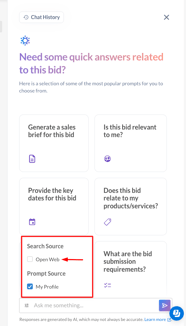
- Web Search in the AI Panel: We’ve added a new Open Web option to the AI panel in Bids, Meetings, and Contracts. When disabled (default), AI responses are limited to the record you’re viewing. Enable Open Web to expand results with information from across the internet, giving you the flexibility to switch between focused record analysis and broader research as needed.
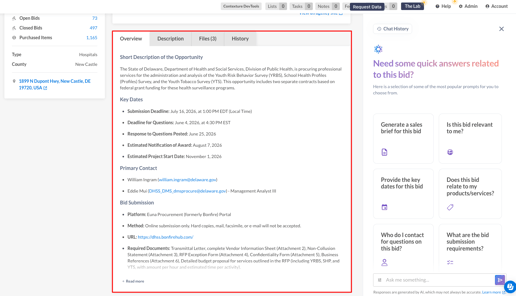
- Bid Overview & Demographic Enhancements: The Bid Details page now features a more concise, skimmable overview highlighting mandatory and technical requirements, submission info, and key contacts. Longer descriptions are now placed behind a "Read More" link. Additionally, Agency Details now include population counts for municipalities and enrollment numbers for K-12 districts.
-
CRM Integration - Saved Search Mapping: We’ve added a new "GovSpend Saved Search Name" field to HubSpot and Salesforce mappings. When configured, this automatically syncs the name of the associated saved search during scheduled integrations to help organize records by territory, product, or initiative.
-
Spending Agency Contact Export Update: We’ve updated the Spending Agency Contact export to include the Agency ID field.
-
Improve Clarity of Email Alert Links: To address feedback regarding confusing alert emails and result counts that didn't always align, we have updated the email logic and added clear "View New Results" and "View All Results" links within the alert email.
- Federal Dataset Updates
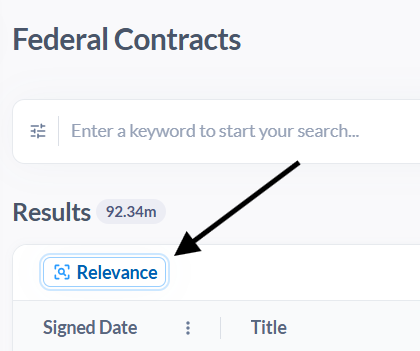
- Contracts & Spending Analytics: A Relevance button is available for you to use if you want to revert sorting to relevancy if you have changed the sort to another criteria/column.
- Contracts: The Relevance button is now available at the top left of the results pane.
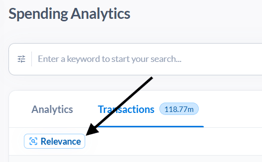
- Spending Analytics: Navigate to the Transactions tab after running a search and the Relevance button appears at the top left of the results pane.
- Contracts: The Relevance button is now available at the top left of the results pane.
- Contracts & Spending Analytics: A Relevance button is available for you to use if you want to revert sorting to relevancy if you have changed the sort to another criteria/column.