![GS Logo-GS platform.png]](https://support.govspend.com/hs-fs/hubfs/GS%20Logo-GS%20platform.png?height=25&name=GS%20Logo-GS%20platform.png)
- Federal Opportunities: The Opportunities module now supports Federal Opportunities, bringing relevant federal signals into one personalized, ranked feed. As new RFXs and other signal sources are identified across the web, GovSpend surfaces opportunities aligned with your Federal Profile to help you discover relevant opportunities earlier. Learn more →
- Territories: You can now customize the geographic and organizational scope you sell into using states, counties, ZIP codes, specific agencies, and demographics. Your territory helps refine Opportunities so the signals you see are more relevant to where and who you sell to. Learn more →
- Custom Input for Demographics: You can now input a completely custom range for Population or Enrollment count in the demographics step. Build your territory exactly as you need for the most refined and accurate results.
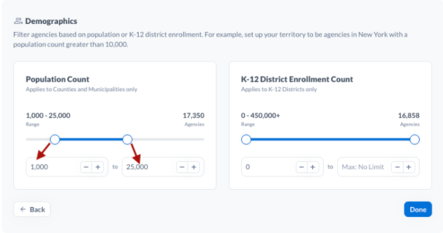
- Custom Input for Demographics: You can now input a completely custom range for Population or Enrollment count in the demographics step. Build your territory exactly as you need for the most refined and accurate results.
-
- Minor Enhancements:
- Territories Help Text: We’ve simplified the help text throughout Territories to make it easier to understand which fields you can use to build your territory. We also added more context to Demographics so you can quickly see which Agency Types each field applies to.
- State Groupings: ZIP codes and agencies are now grouped by state when building a Territory, making it easier to find and select the areas and agencies you want to target.
- Opportunity Refresh Status: When you select “Refresh Opportunities,” you’ll now see a “Getting your opportunities” message while your results are being processed, so you know your refresh is underway.
- Minor Enhancements:
- Integration Updates
-
Slack Opportunities: You can now integrate Opportunities directly into a Slack channel of your choice. Choose to manually push individual records or receive a daily digest, giving your team flexibility in how they stay informed. Learn more →
- Agency Contacts CRM Integration: You can now select one or multiple contacts from the Agency Contacts tab in Spending and add them directly to your connected CRM in a single action. This makes it easier to quickly push agency contacts into your CRM. Learn more →
- Connection Status: You can now see a clear "Connected" status for your integrations, along with a corresponding option to disconnect, making it easier to confirm an integration is active.
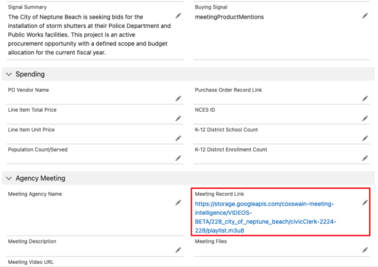
- Send Files and Meeting Videos to Your CRM from Signals: When you send a Bid, Contract, or meeting-based signal to your CRM, you can now include links to the associated files and meeting videos where available, so your team has that context without leaving your CRM.
-
- New "GovSpend User Email" Field for CRM Integrations: CRM integration mappings now include a GovSpend User Email field, containing the email address of the user who ran or scheduled the integration. Because email is unique per user, it can be used to build a CRM workflow that automatically routes records to the correct owner, rather than leaving them assigned to whoever triggered the sync.
- Log into GovSpend
- Go to your CRM integration configuration
- In the field mapping wizard, look for GovSpend User Email under the available fields for a record type
- Map it to a field in your CRM, then repeat for any other record types you want it included in
- Pavilion Signals Now Available in Opportunities: Third-party signals from Pavilion are now surfaced directly in your Opportunities feed, giving you visibility into agency activity and pre-RFP buyer intent you won't find through public postings alone. These signals appear alongside your existing GovSpend signals, so you can spot opportunities earlier and act on them before they hit the formal bid phase. Learn more →
- AI Contract Overview and PDF Export: Contract records now include an AI-generated Overview tab that summarizes key contract details, dates, and parties involved. You can also generate and download the overview as a PDF, similar to the existing Bid Overview feature.
- Go to the Contracts module and select a contract
- The Overview tab displays automatically
- Scroll to the bottom of the tab
- Click "Generate Contract Overview" to download a PDF
- Agency Search Improvements: We’ve enhanced the Agency search tool available in AI Search and the GovSpend MCP Server to return more complete agency information without requiring additional prompting.
- Agency responses now include descriptive profile information automatically.
- Parent and child agency relationships are clearly identified.
- Responses now make it clear when specific agency information is unavailable.
- Ambiguous agency names return all potential matches so you can select the right one.
- Agency Search now supports both individual Agency Name lookups and lists of agencies.
- User Interface & Minor Updates
- Scrolling Improvements: Improved page-level scrolling has been introduced to all search pages across the app. Instead of scrolling within a small table window, the whole page now scrolls, so you can see more results at once without scrolling back and forth within a confined table view.
- Population Count Added to Agency Stats Tab: The Agency Stats tab in Spending now includes Population Count as an available column.
- Tooltips Added for Search Filter Labels: "Fuzzy" and "Exact" search filter options now include tooltips explaining how each one works, so you can better understand why certain results appear.
- Exact-Match Search: We’ve added clearer guidance to the Exact and Fuzzy company search options. Exact search ignores common legal terms like Corporation, Inc., and LLC, helping you find close variations of a company name without missing relevant results.
- Login Troubleshooting: The GovSpend and BidSearch login pages now include a link to troubleshooting resources, making it easier to resolve common login issues.
- Saved Search Tags: You can now search by tags when selecting a Saved Search from the Dashboard, making it easier to find searches associated with a specific client, team member, or other tag.
- PO Details: We’ve removed the internal “Score” field from line item details on the PO Details page for a cleaner, more relevant view.
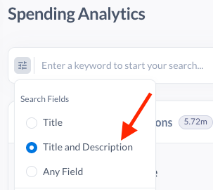
- Federal Search Defaults: Search settings across all GovSpend Federal modules, including SAM Opportunities, Contracts, and Spending Analytics, will now default to “Title and Description.” Saved Searches will not be impacted and will continue using the search setting selected when they were created. Selecting “Reset All” will apply the new default setting. This change provides greater consistency across the GovSpend platform while reducing noisy or less relevant search results.