![GS Logo-GS platform.png]](https://support.govspend.com/hs-fs/hubfs/GS%20Logo-GS%20platform.png?height=25&name=GS%20Logo-GS%20platform.png)
- MCP Server
- OAth is now enabled to make connecting to our MCP Server much simpler. Learn more →
- User Profile & Opportunities: MCP now supports GovSpend customer user profiles for personalized, session-persistent context, and enables querying and acting on Opportunities directly within your tools.
- User Profile: Added a new user profile context tool that automatically retrieves the authenticated user's GovSpend profile, enabling personalized responses without requiring you to provide preferences in each session.
- Opportunities: Added a new Opportunities tool that lets you retrieve, analyze, prioritize, and take action on their GovSpend opportunities directly within your preferred AI platform, with links back to GovSpend for full opportunity details.
- CRM Hubspot Account Mapping: We have introduced Hubspot Account Mapping, an optional feature to ensure that when you add records to your CRM, they sync with your existing data. By using GovSpend Agency IDs as a unique identifier, this update allows the system to link records directly to your established Hubspot Accounts to help prevent duplicate entries. To use this functionality, please reach out to your Relationship Manager for assistance in populating GovSpend Agency IDs within your Hubspot instance and enabling the mapping in your configuration.
- Opportunities Module
- Contacts
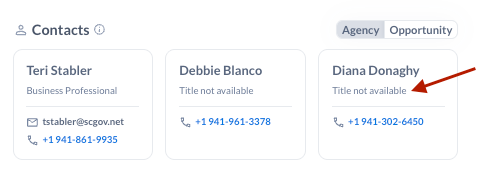
- We’re including up to 3 contacts from the underlying GovSpend record (bid, contract, meeting) in the Opportunities detail view. You can access both Agency Contacts and the specific Opportunity Contacts within the Opportunity for more streamlined outreach efforts. Learn more →
- You can now goggle between Agency or Opportunity contacts
- If a title is not available, the contact record now says "Title not available"
- Contacts
-
- Overview PDF: The Overview PDF has been redesigned to maximize information visibility and now includes both Agency Contacts and Opportunity Contacts to support more efficient outreach. Learn more →
- Left Hand Navigation Menu Functionality
- Menu items with only one option are now clickable via either the menu icon or the label when the menu is in a collapsed state
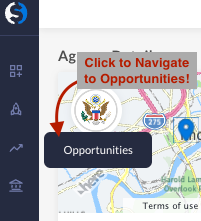
- Collapse the left nav menu
- Hover over the Opportunities item
- Click the Opportunities icon to navigate to the Opportunities page (available before) OR
- Click the “Opportunities” flyout label to navigate to the opportunities page (new)
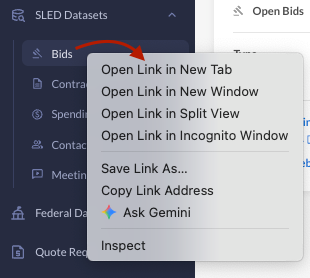
- Right click to open menu items in a new tab: In either the expanded or collapsed state, you can right click a menu item and open in a new tab.
- Menu items with only one option are now clickable via either the menu icon or the label when the menu is in a collapsed state
- Agency Employee Count: Currently, employee count is available exclusively in Agency Search, where you can filter by it, display it as a column, and include it in exports.
- Standardized export behavior: When you choose Visible Columns Only during export, the system now exports only the columns currently visible on screen. The GovSpend Record Link column is the only exception and will always be included.
- Improved visibility of Saved Search names: Saved Search names now display in full when you hover over them, making it easier to identify longer names that may be truncated by the fixed column width.