![GS Logo-GS platform.png]](https://support.govspend.com/hs-fs/hubfs/GS%20Logo-GS%20platform.png?height=25&name=GS%20Logo-GS%20platform.png)
- Introducing The Lab: Explore early concepts and roadmap ideas, then rate them and share your feedback to help shape what comes next. Your input directly influences GovSpend’s future roadmap.
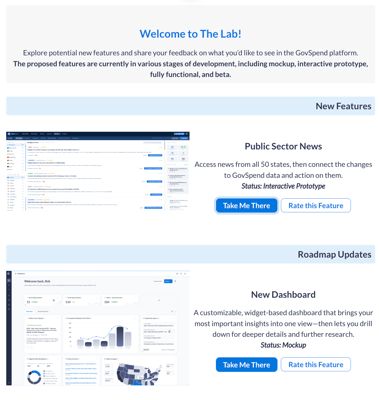
- In the top toolbar you’ll notice that “New Features” is now called “The Lab”
- Click to open a modal with information on the items or ideas we are looking to get feedback on.
- Click “Rate this Feature” to rate the ideas and provide additional feedback!
- Note: We’ll be rotating items in this menu, swapping in new ideas in order to get a healthy amount of feedback to inform our future roadmap.
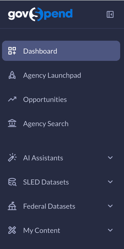
- Left-Hand Navigation menu: We’ve given the Left Navigation menu a face lift, creating nested categories and an expand/collapse functionality to improve the user experience.
- Opportunities module:
- Scheduled CRM Integrations for Signals: You can now receive an automated push of new opportunities directly to your CRM, just like email alerts. Please note that you must have CRM integration permissions and completed Signals mappings in order to access this feature. Learn more→
- Contact Relevance Improvements: View additional priority logic to the display of Agency Contacts on Opportunities to target true decision-makers. Learn more →
- Hide Signals based on States Removed from My Profile: When you remove states from your States Served filter in your profile, you’ll now also remove related signals from your Opportunities—helping you cut out irrelevant noise before new signals are generated. Learn more →
- Integrate contacts from Opportunities: Integrate the primary contact information shown on an opportunity to Salesforce or Hubspot via our CRM integration, so that you can take action directly from your CRM. Learn more →
- State Filter: Filter by state in the Opportunities module
- Contact Selection for Outreach Email: When generating an outreach email, you can now select you preferred contact to email from the 3 displayed
- Buying Signal Name/Description Improvements: We’ve adjusted the names of Buying signals slightly and added more detailed descriptions to bring consistency and clarity to what each signal represents
- Contract Signal Enhancement: We’ve adjusted the logic of the expiring contract signal to ensure we capture existing contracts that enter into the 12 month expiration threshold
- Generate Signal Overview: This action is now available in Opportunities, allowing you to print a PDF overview of the signal plus additional context from the underlying GovSpend record. Learn more →
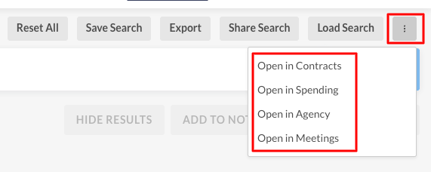
- Open In Meetings: Seamlessly transition your search criteria between Meetings and the Bids, Contracts, Spending, and Contacts modules. This update enables full "Open In" functionality in both directions, allowing you to move from a meeting insight directly into a deep dive (and vice versa) without re-entering your filters.
- GovSpend Federal
- Updated Contracts module: Access broader research and opportunity discovery at the contract level. Learn more →
- Create Alerts for Contracts: You can now create alerts for Federal Contracts saved searches either from the Saved Searches page or directly after saving a new search.
- New Spending Analytics module: Access analysis, trends, and visual dashboards at the transaction level. Learn more →
- Integration Updates
- Iris: We are excited to launch our new integration with Iris! This update allows you to push bid documents directly into Iris with a single click. By eliminating manual downloads and uploads, you can move straight from discovery to drafting your proposal without leaving your workflow. Simply click the Add to Iris button on any bid. Learn more about Iris →
- CRM | Salesforce Account Mapping: We have introduced Salesforce Account Mapping, an optional feature to ensure that when you add records to your CRM, they sync with your existing data. By using GovSpend Agency IDs as a unique identifier, this update allows the system to link records directly to your established Salesforce Accounts and to help to prevent duplicate entries, so that data is successfully pushed to your Salesforce CRM. To use this functionality, please reach out to your Relationship Manager for assistance in populating GovSpend Agency IDs within your Salesforce instance and enabling the mapping in your configuration.
- List Statuses: View list statuses like "Submitted," "In Progress," and "Disqualified."